Configure Funnel Stages
Map your sales pipeline stages to Adsu's funnel for accurate attribution tracking.
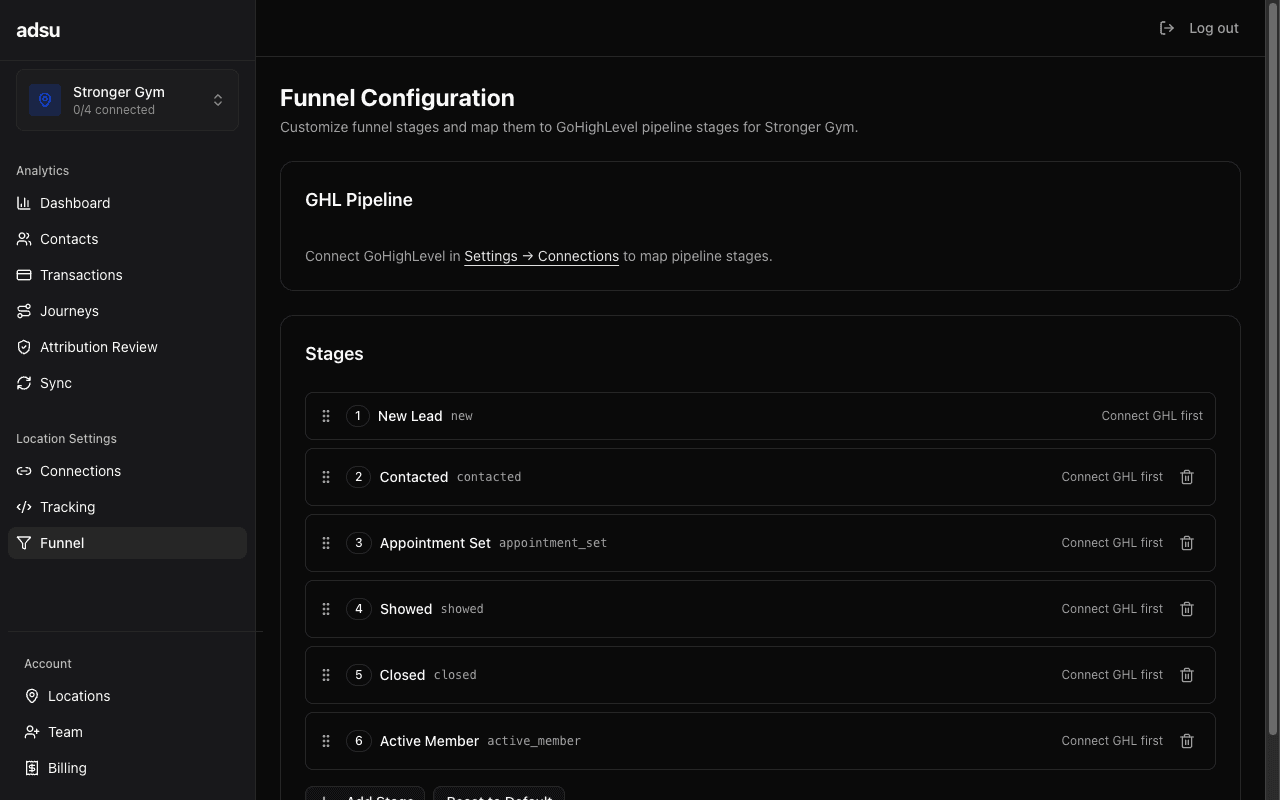
Adsu uses a standardized funnel to track how leads progress from first contact to paying member. This funnel maps directly to your GoHighLevel pipeline so that when a contact moves through your sales process in GHL, Adsu automatically updates their funnel stage, calculates stage-level metrics, and (for Meta-sourced contacts) sends conversion events back to Facebook.
The Adsu Funnel
Adsu's funnel consists of six stages, ordered from earliest to deepest:
- New — The contact just entered your system. They filled out a form, submitted a lead ad, or were created in GHL. No sales activity has occurred yet.
- Contacted — Your team or an automation has reached out, or the lead has responded to an initial message. This stage indicates engagement has begun.
- Appointment Set — The contact has a scheduled appointment, whether it is a gym tour, consultation, trial class, or any other in-person visit.
- Showed — The contact actually showed up for their appointment. This is an important milestone because it indicates genuine interest beyond just booking.
- Closed — The contact made a purchase. This could be a one-time payment (drop-in, personal training package) or the first payment of a membership.
- Active Member — The contact has an active recurring subscription. This is the deepest stage, representing ongoing revenue.
Stages Only Move Forward
Adsu enforces advance-only semantics. A contact at "appointment_set" can advance to "showed" or "closed," but can never be demoted back to "contacted" or "new." This prevents data inconsistencies from webhook ordering issues or duplicate signals.
If a contact skips a stage (e.g., goes directly from "new" to "closed" because they purchased without booking an appointment), Adsu handles this correctly — stages can be skipped but never reversed.
How Stages Map to GHL
Each Adsu funnel stage can be linked to your GoHighLevel pipeline in two ways:
- Pipeline stage mapping (ghlStageId) — Maps an Adsu funnel stage to a specific stage in your GHL pipeline. When a contact's opportunity is moved to that pipeline stage in GHL, Adsu updates their funnel stage accordingly.
- Opportunity status mapping (ghlStatus) — Maps to GHL's opportunity status values: "open," "won," "lost," or "abandoned." For example, you might map "closed" to the "won" status so that marking an opportunity as won in GHL advances the contact to the closed stage.
You can use either or both mapping methods for each stage. Pipeline stage mapping is typically used for the middle stages (contacted, appointment_set, showed), while opportunity status mapping is useful for terminal stages (closed = won).
Configuration Steps
Navigate to the Funnel settings
In your Adsu dashboard, go to Settings > Funnel. You will see the six funnel stages listed with mapping fields next to each one.
Select your GHL pipeline
At the top of the page, select the GoHighLevel pipeline that represents your sales process from the dropdown. This loads the pipeline's stages so you can map them to Adsu's funnel.
If you do not see your pipelines, make sure your GoHighLevel integration is connected (see Connect GoHighLevel).
Map each funnel stage
For each Adsu funnel stage, select the corresponding GHL pipeline stage from the dropdown. A typical mapping might look like:
- New → "New Lead" or "Incoming"
- Contacted → "Contacted" or "Responded"
- Appointment Set → "Appointment Booked" or "Scheduled"
- Showed → "Showed Up" or "Trial Completed"
- Closed → "Closed Won" or "Signed Up" (and/or opportunity status = "won")
- Active Member → "Active" or "Member" (optional — often auto-detected via Stripe subscriptions)
Save your configuration
Click Save to apply the mapping. From this point on, any stage changes in your GHL pipeline will automatically update the corresponding funnel stage in Adsu.
Auto-Advance Behavior
In addition to manual pipeline moves in GHL, Adsu automatically advances contacts through funnel stages based on hard signals from other integrations. This means your pipeline stays accurate even if your team does not always update the GHL opportunity manually:
Automatic Stage Advances
- Appointment Set — When a contact books an appointment through your GHL calendar (detected via the AppointmentCreate webhook), they are automatically advanced to appointment_set.
- Contacted — When a lead sends an inbound message through GHL (SMS, email, or chat), they are automatically advanced to contacted.
- Closed — When a Stripe charge is matched to a contact, they are automatically advanced to closed.
- Active Member — When a contact has an active recurring Stripe subscription, they are automatically advanced to active_member.
These auto-advances work alongside manual pipeline moves. If your sales rep moves a contact to "Appointment Booked" in GHL and the contact also books through the calendar, both signals target the same stage — Adsu deduplicates them safely.
Stage History
Every stage change is recorded in the contact's stage history with a timestamp and source identifier. This gives you full visibility into how and when each contact moved through the funnel:
- webhook — Stage advanced from a GHL pipeline move
- sync_catchup — Stage advanced during a scheduled contact sync (detected a pipeline move that was missed by webhooks)
- auto_calendar — Stage advanced because the contact booked a GHL calendar appointment
- auto_payment — Stage advanced because a Stripe charge was matched to the contact
- auto_subscription — Stage advanced because the contact has an active Stripe subscription
- auto_conversation — Stage advanced because the contact sent an inbound message in GHL
- api — Stage advanced manually via the API
Meta CAPI and Funnel Stages
When a Meta-sourced contact advances through certain funnel stages, Adsu sends a conversion event to Meta via the Conversions API. This is how funnel stages connect to ad optimization:
- Appointment Set triggers a Schedule event in Meta
- Showed triggers a custom AppointmentShowed event
- Closed and Active Member trigger a Purchase event (with the contact's lifetime value included)
The "new" and "contacted" stages do not trigger CAPI events because Meta already receives initial lead data through the lead form webhook or Pixel.
See Meta CAPI Feedback for more details on how conversion events are sent and how they improve your ad performance.
Best Practices
- Keep your pipeline simple — Adsu works best with a linear pipeline that matches the standard gym sales process. Avoid complex branching pipelines with too many stages.
- Map every stage you use — Unmapped pipeline stages will not trigger funnel updates in Adsu. If you have a stage in GHL that represents a meaningful step in your sales process, map it.
- Use opportunity statuses for terminal stages — Mapping "closed" to the GHL opportunity status "won" ensures that any deal marked as won advances the contact, regardless of which specific pipeline stage it is on.
- Trust auto-advance for hard signals — You do not need to manually move contacts in GHL when appointments are booked or payments are made. Adsu handles these automatically. Focus your manual pipeline management on the stages that require human judgment (like confirming a show-up).
Troubleshooting
- Stage changes in GHL not reflected in Adsu — Verify that the pipeline is selected on the Funnel settings page and that the specific stage is mapped. Check that the opportunity's pipeline ID matches the configured pipeline (Adsu ignores stage changes from other pipelines).
- Contact stuck at an early stage — Check the contact's stage history to see if any advance attempts were recorded. If the contact is at "closed" and you expected "active_member," ensure they have an active Stripe subscription (not just a one-time charge).
- CAPI events not firing for stage changes — CAPI only fires for Meta-sourced contacts (those with fbclid or sourceType "meta"). Non-Meta contacts are silently skipped. Also verify that a Meta Pixel was discovered for your location.