Attribution Review
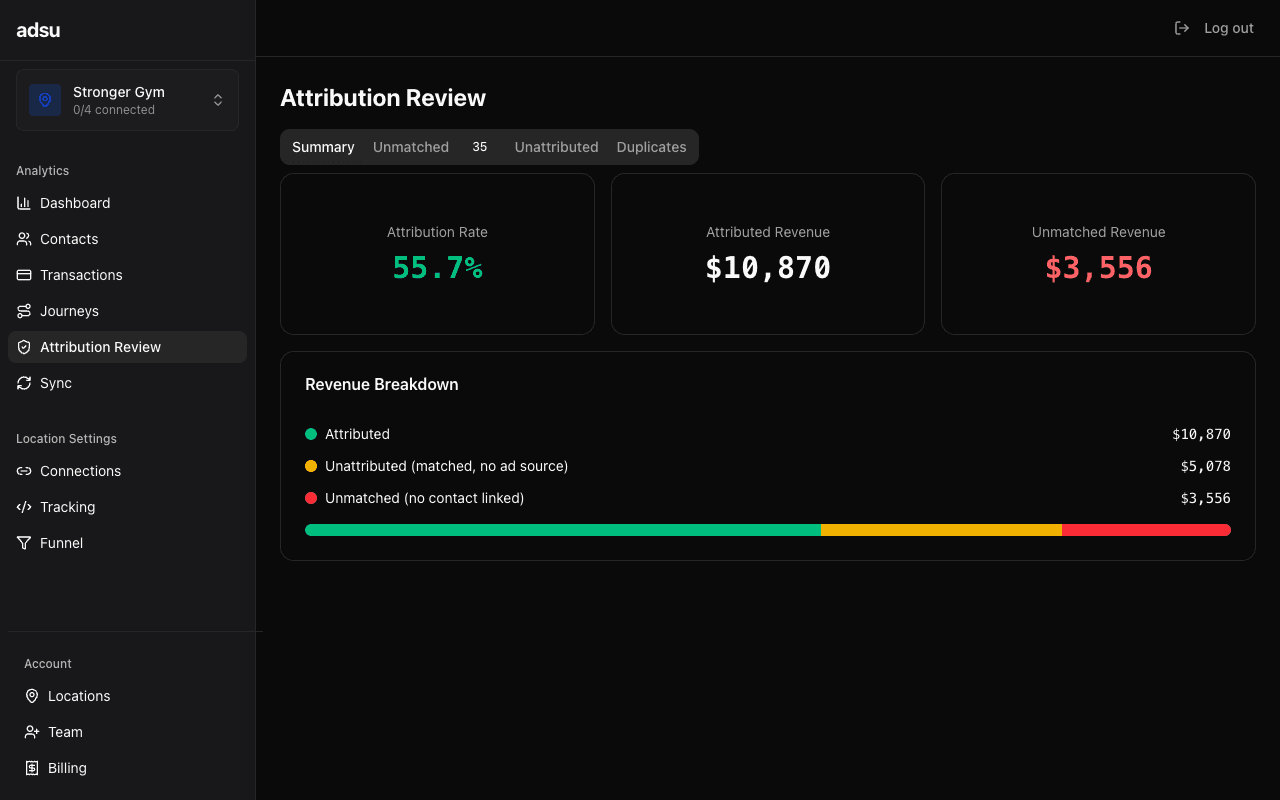
Review and resolve flagged attribution matches that need human verification.
Adsu's matching engine uses multiple signals to link contacts to ad touchpoints and transactions. Most matches are high-confidence: an exact email match between a Stripe customer and a GHL contact, or a phone number that maps directly to a lead form submission. These matches are processed automatically and never appear on this page.
However, some matches rely on lower-confidence signals and get flagged for human review. The Attribution Review page is where you evaluate these flagged matches and decide whether to approve or reject them. This ensures your attribution data stays accurate without requiring you to manually review every single match.
Why Matches Get Flagged
The matching engine processes identity signals in priority order. The first four levels (email exact, phone exact, visitor fingerprint, and IP + time window) cover most scenarios. The last two levels produce lower-confidence matches that are flagged for review:
- IP + Time Window Matches — When a tracking script visitor and a contact share the same IP address within a short time window, but no stronger signal (email, phone, fingerprint) links them. This can produce valid matches (someone on their home WiFi who fills out a lead form), but it can also produce false positives (multiple people on the same gym WiFi network or office IP).
- Name Fuzzy Matches — When the matching engine finds a close but not exact name match between a contact and a transaction or touchpoint. For example, "Mike Smith" and "Michael Smith" would trigger a fuzzy match. These are often correct, but they can also match unrelated people who happen to share similar names.
High-confidence matches (email exact, phone exact, visitor fingerprint) are never flagged. They are applied automatically because the false positive rate is extremely low.
The Review Interface
Each flagged match appears as a card in the review queue. The card displays all the information you need to make a decision:
- Match Type — Which matching signal triggered the flag (IP + time window or name fuzzy).
- Confidence Score — A numerical score representing how confident the engine is in this match. Higher scores indicate stronger matches. The score takes into account signal strength, time proximity, and corroborating data points.
- Contact Details — The name, email, and phone number of the contact being matched.
- Matched Entity — What the contact is being linked to. This could be a transaction (Stripe payment), a touchpoint (ad interaction), or a visitor session (tracking script data).
- Supporting Evidence — Additional data points that support or weaken the match. For IP matches, this includes the IP address, timestamps of both events, and whether other stronger signals partially corroborate the match. For name matches, this shows the exact names being compared and any partial email or phone overlap.
Approving a Match
When you approve a flagged match, Adsu treats it as a confirmed attribution link. The contact is linked to the touchpoint or transaction, and the revenue is included in your campaign attribution calculations. The match is removed from the review queue.
Approved matches behave identically to automatic high-confidence matches. Once approved, the attribution is computed using your selected model, and the revenue appears in your campaign ROAS, the contact's LTV, and the transaction's matched status.
Rejecting a Match
Rejection is permanent
Rejecting a match removes the attribution link between the contact and the touchpoint or transaction. The transaction becomes unmatched, and the revenue is no longer attributed to any ad campaign. This action cannot be undone. If you reject a match by mistake, the matching engine will not re-flag it in future runs.Reject a match when the evidence clearly indicates a false positive. For example, if an IP + time window match pairs a Stripe payment from "Jane Doe" with a website visitor session that later submitted a form as "John Doe," the IP match is likely coincidental (two people on the same network), and you should reject it.
Review Queue Management
The review queue shows all pending flagged matches, sorted by confidence score (highest first). This means the matches most likely to be correct appear at the top.
You can filter the queue by:
- Match Type — Show only IP + time window matches or only name fuzzy matches.
- Confidence Score — Filter to matches above or below a certain confidence threshold.
- Date — Show flagged matches from a specific time period.
Impact on Dashboard Metrics
Flagged matches that have not been reviewed do not affect your dashboard metrics. Until a match is approved, the revenue from that transaction is not counted in your campaign ROAS, and the contact's touchpoints are not included in attribution calculations.
This means your dashboard numbers represent only confirmed attribution. If you have a large queue of unreviewed matches, your reported ROAS may be lower than the true value because some valid matches are sitting in the queue waiting for approval.
Keep the queue short
We recommend reviewing flagged matches at least weekly. A backlog of unreviewed matches means revenue is sitting unattributed, which makes your campaign performance reports less accurate. Most reviews take just a few seconds per match — the supporting evidence usually makes the right decision obvious.Reducing Flagged Matches
The fewer flagged matches you see, the more accurate your automatic attribution is. Here are ways to reduce the volume of flagged matches:
- Ensure consistent emails — The number one cause of flagged matches is mismatched email addresses between systems. When a lead uses one email on your lead form and a different email in Stripe, the engine falls back to lower-confidence signals. Encourage your front desk staff to use the same email across GHL and Stripe.
- Capture phone numbers — Phone is the second-strongest matching signal after email. If your lead forms capture phone numbers, more matches will resolve at the high-confidence level.
- Install the tracking script — The tracking script captures visitor fingerprints that provide a strong identity signal. Without the tracking script, the engine relies more heavily on email and phone matching.
Duplicate Detection
Separate from the attribution matching review, Adsu also runs a weekly duplicate contact scan. If two contacts in your database appear to be the same person (similar name, overlapping email or phone), they are flagged as potential duplicates. Duplicate pairs appear in a separate section of the review interface with their confidence scores and overlapping identity signals.
Resolving duplicates helps improve future matching accuracy. When two contact records represent the same person, their touchpoints and transactions can be consolidated, giving you a more complete journey view and more accurate LTV calculations.