Contacts
View all leads with their source, funnel stage, and attribution data.
The Contacts page shows every lead in your gym's pipeline with full attribution data attached. This is where you can see not just who your leads are, but exactly where they came from, where they stand in your funnel, and how much revenue they have generated.
Contacts flow into Adsu from multiple sources: Meta lead forms, Google form fills, your website tracking script, and GoHighLevel contact creation. Adsu's matching engine unifies these signals so each person appears as a single contact, even if they interacted with multiple channels.
Contact List
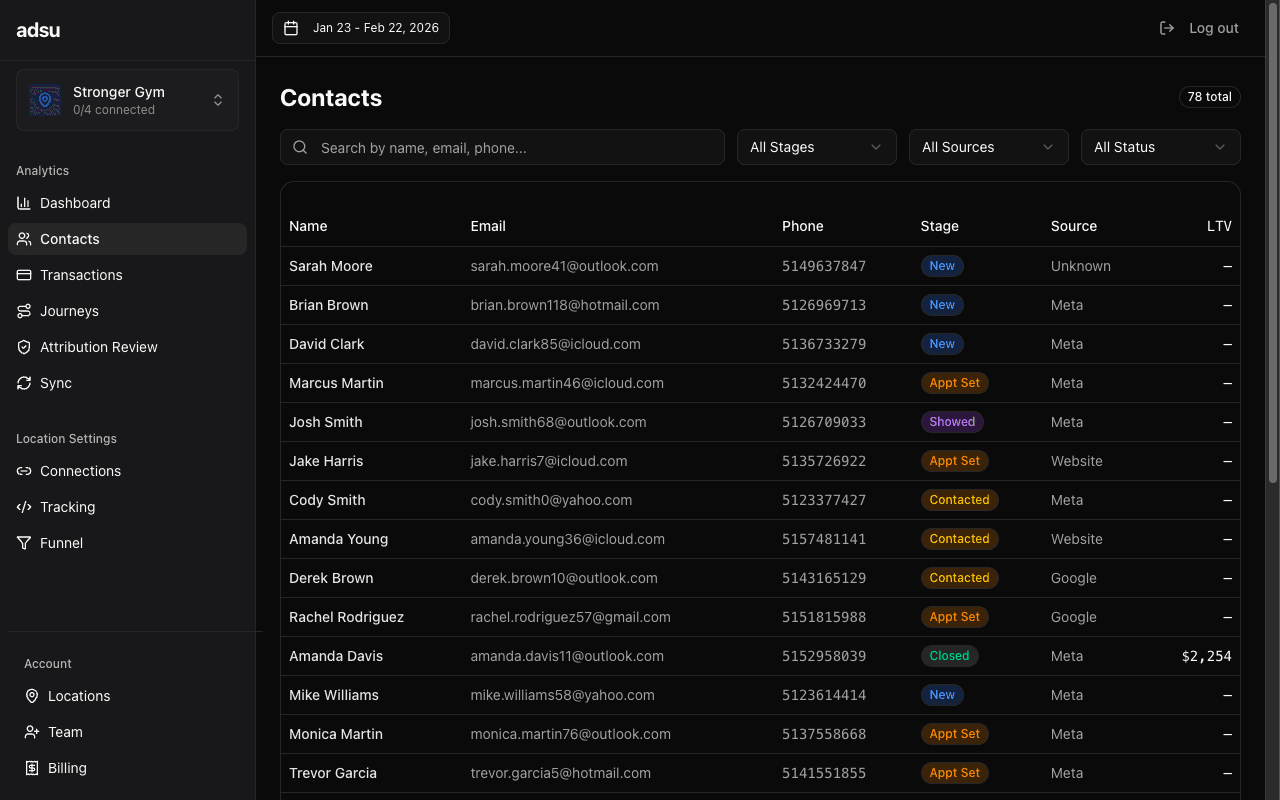
The main view is a searchable, filterable table showing all contacts for your selected location and date range. Each row displays:
- Name — The contact's full name as synced from GoHighLevel or captured via your lead form.
- Email — The primary email address. Adsu normalizes emails (lowercase, trimmed) to ensure accurate matching and deduplication.
- Phone — The contact's phone number. Used as a secondary matching signal when email is not available.
- Source — Where the contact originated. Possible values include Meta (Facebook/Instagram ads), Google (Google Ads), Organic (website visit without an ad click), and GHL (created directly in GoHighLevel). A badge indicates the source type.
- Funnel Stage — The contact's current position in your sales funnel. Stages follow your configured funnel: new, contacted, appointment_set, showed, closed, and active_member. A color indicator shows the stage.
- Lead Date — When the contact first entered your system. This is the date of their earliest recorded interaction, whether that was a form submission, ad click, or GHL contact creation.
- LTV (Lifetime Value) — The total revenue from Stripe POS payments attributed to this contact. This includes one-time charges and recurring membership payments. Contacts who have not yet made a payment show $0.
Searching and Filtering
The search bar at the top of the table accepts name, email, or phone number queries. The search is partial-match, so typing a few characters will begin narrowing results immediately.
You can filter the contact list by:
- Funnel Stage — Show only contacts at a specific stage (for example, all contacts in the "appointment_set" stage to review upcoming introductory sessions).
- Source — Filter to see only contacts from Meta, Google, Organic, or GHL. Useful for comparing lead quality across channels.
- Date Range — Controlled by the global date range selector. Only contacts whose lead date falls within the range are shown.
Filters can be combined. For example, you can view all Meta-sourced contacts in the "new" stage from the last 7 days to check how quickly your team is following up on fresh Facebook leads.
Contact Detail View
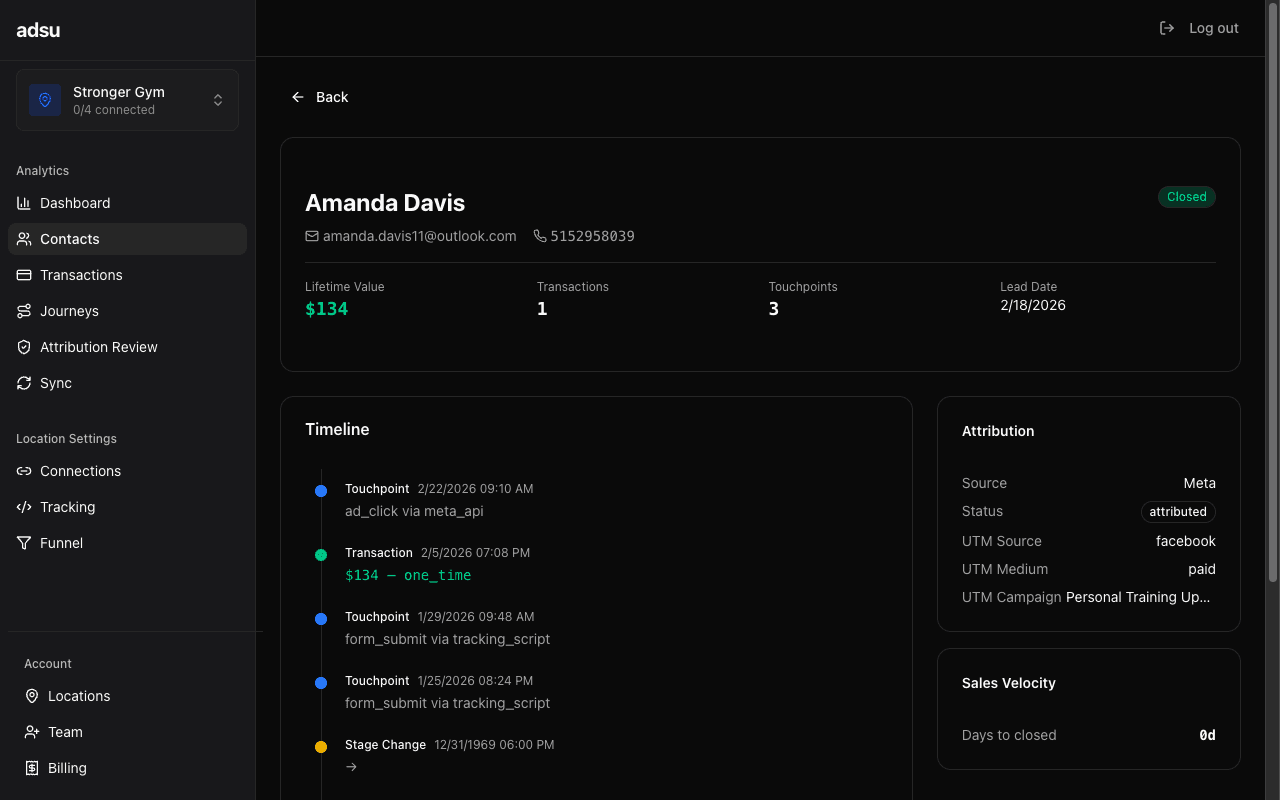
Click on any contact row to open the full detail view. This page shows everything Adsu knows about that person:
Journey Timeline
A chronological timeline of every recorded interaction. This includes ad clicks, page views on your website, form submissions, appointment bookings, pipeline stage changes, and Stripe payments. Each event is timestamped and labeled with its source, giving you a complete picture of the contact's path from first ad impression to current status.
Touchpoints
The touchpoints section shows each ad interaction linked to this contact. For each touchpoint, you can see the campaign name, ad set, specific ad creative, the interaction type (click, view, form submission), and the timestamp. If the contact has attributed revenue, the attribution weight for each touchpoint is displayed based on your selected model.
Matched Transactions
All Stripe POS payments matched to this contact appear here. Each transaction shows the amount, date, and whether it was a one-time charge or part of a recurring subscription. The total of these transactions is the contact's lifetime value.
Stage History
A log of every funnel stage change the contact has gone through, including the timestamp and the source of the change. Sources include GHL webhook (pipeline stage move), auto_calendar (appointment booking), auto_payment (Stripe charge), auto_subscription (Stripe subscription activated), and sync_catchup (caught during periodic GHL sync).
Speed-to-lead tracking
For contacts in the "new" or "contacted" stage, Adsu tracks speed-to-lead: the time between the contact's most recent intent signal and the first manual staff outbound message in GoHighLevel. This metric appears on the contact detail view and helps you measure how quickly your team responds to fresh leads. Faster response times correlate strongly with higher conversion rates.Funnel Stage Breakdown
The Contacts page includes a summary bar at the top showing how many contacts are at each funnel stage for the selected date range. This gives you a quick funnel health check without needing to filter:
- New — Leads who have not been contacted yet.
- Contacted — Leads your team has reached out to, or who sent an inbound message.
- Appointment Set — Contacts who booked an introductory session or consultation.
- Showed — Contacts who attended their appointment.
- Closed — Contacts who made their first payment.
- Active Member — Contacts with an active recurring subscription.
These stages correspond to your configured funnel stages, which map to your GoHighLevel pipeline. When a contact moves through your GHL pipeline, their stage updates automatically in Adsu. Hard signals like appointment bookings, Stripe payments, and subscription activations also advance the stage automatically without requiring a manual pipeline move.
Finding stuck leads
Filter by the "new" stage and sort by lead date (oldest first) to find leads that have been sitting untouched. These are opportunities your team may have missed. A high count of stale leads in the "new" stage often indicates a follow-up process bottleneck.Data Sources
Contact data is aggregated from multiple integrations. GoHighLevel is the primary source of contact records and pipeline stage data. Meta and Google contribute ad interaction data via lead form webhooks and campaign syncs. The tracking script adds website page views and form submissions. Stripe provides payment and subscription data.
Adsu's matching engine ties all of these signals together using email, phone, visitor fingerprint, and other identity signals. This is why a single contact can show touchpoints from multiple sources in their journey timeline, even if they were originally created in one system.