Transactions
See every Stripe payment matched to the ad that generated it.
The Transactions page closes the attribution loop. This is where you see actual Stripe POS payments from your gym, each matched back to the ad campaign that brought the customer in. While other pages focus on leads and funnel stages, this page focuses on dollars: real revenue from real payments, connected to the ads that made them happen.
How Transactions Get Here
When a payment is processed through your gym's Stripe account, Adsu captures it via the Stripe Connect integration. The matching engine then attempts to link each transaction to a known contact by matching the Stripe customer email or other identity signals against your contact database. If a match is found, Adsu looks up that contact's ad touchpoints and attributes the transaction to the relevant campaigns.
This process runs automatically. Stripe transactions sync hourly, and the matching engine runs every 30 minutes. New payments typically appear in the Transactions view within an hour or two of being processed.
Transaction Table
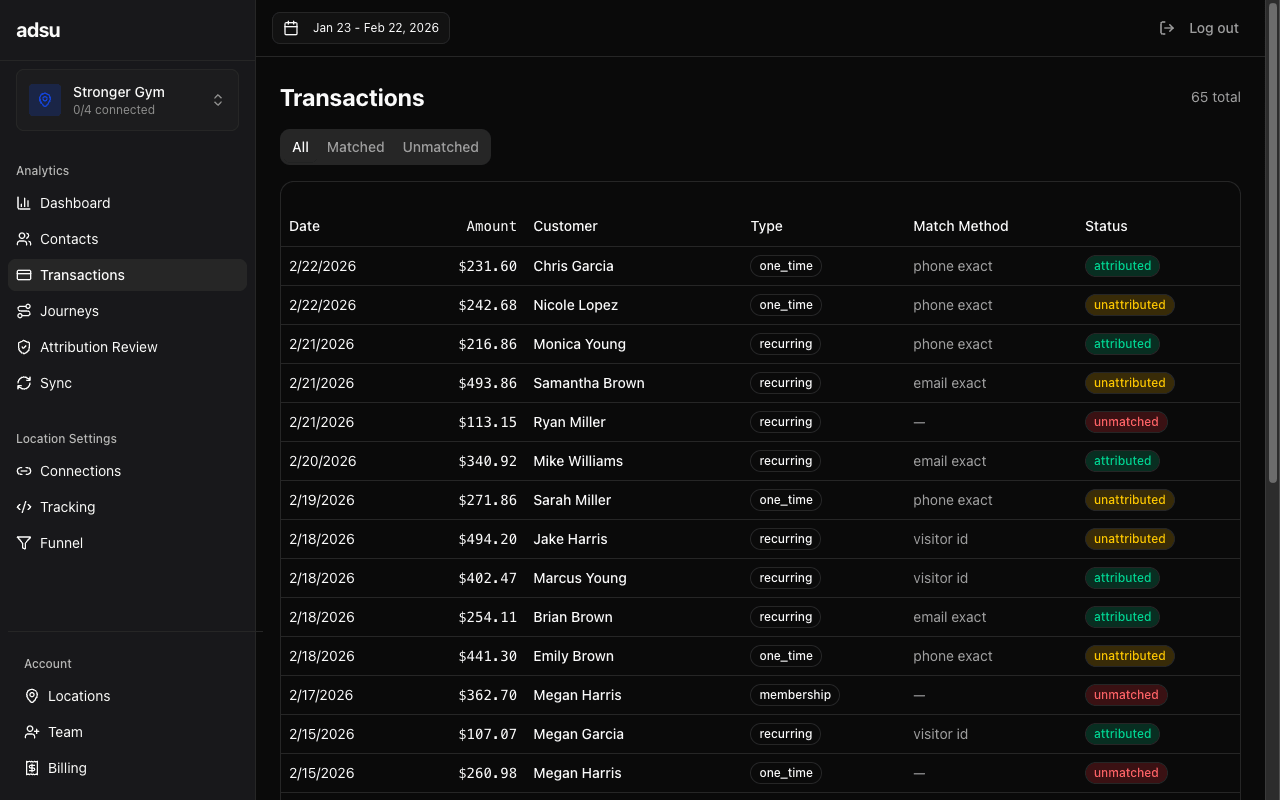
The table displays one row per transaction with the following columns:
- Amount — The payment amount in dollars. This is the gross charge amount from Stripe, before any Stripe processing fees.
- Date — When the payment was processed. This is the Stripe charge creation timestamp.
- Contact — The name of the matched contact. Clicking the contact name navigates to their full contact detail view. If the transaction could not be matched to a contact, this shows "Unmatched."
- Campaign — The attributed campaign or campaigns. When a contact has multiple touchpoints, you may see more than one campaign listed, with the attribution weight shown as a percentage next to each. The weights depend on your selected attribution model.
- Attribution Weight — A decimal between 0 and 1 representing how much credit this transaction gives to the matched campaign. Under First Touch or Last Touch, this is always 1.0 (100%). Under Linear or Time Decay, it may be split across multiple campaigns.
- Status — Whether the transaction is matched (linked to a contact and campaign), partially matched (linked to a contact but no ad touchpoints found), or unmatched (could not be linked to any contact).
Understanding Match Status
Not every transaction will be attributed to an ad campaign. There are three possible states:
- Matched — The transaction is linked to a contact who has at least one ad touchpoint. Full attribution is computed, and the revenue appears in your campaign ROAS calculations.
- Partially Matched — The transaction is linked to a known contact, but that contact has no recorded ad touchpoints. This can happen when someone was added to your GHL pipeline manually or came through an organic channel with no ad interaction.
- Unmatched — Adsu could not link the Stripe payment to any contact. This typically happens when the Stripe customer email does not match any email in your contact database, or the payment was made under a different name or email than the one in GHL.
Improving your match rate
Unmatched transactions represent revenue that cannot be attributed to any ad campaign. To improve your match rate, ensure that the email address in your Stripe POS aligns with the email in GoHighLevel. The most common cause of unmatched transactions is a contact using one email for the lead form and a different email for payment. You can review unmatched transactions and their details in the Attribution Review page.Filtering Transactions
You can filter the transaction table by:
- Status — Show only matched, partially matched, or unmatched transactions. Filtering to unmatched is useful for identifying revenue gaps in your attribution.
- Date Range — Controlled by the global date range selector. Only transactions within the selected dates appear.
- Amount Range — Filter by minimum or maximum transaction amount to focus on high-value payments or membership charges specifically.
Transaction Types
Adsu captures two types of Stripe charges:
- One-time charges — Individual payments like intro offer purchases, personal training sessions, or retail sales. These are captured from standard Stripe charges.
- Subscription payments — Recurring membership charges. When a contact has an active Stripe subscription, each billing cycle payment appears as a separate transaction. The contact's lifetime value accumulates with each recurring charge.
Both types are attributed the same way. The attribution weight is based on the contact's ad touchpoints and the selected model, regardless of whether the payment was a one-time charge or a subscription renewal.
Revenue and Attribution Models
The revenue figures on the Transactions page reflect the selected attribution model. When you change the model, the campaign assignment and attribution weights update accordingly. The transaction amount itself does not change (it is always the Stripe charge amount), but how that revenue is credited to campaigns does.
For example, a $200 membership payment from a contact who interacted with three campaigns would show:
- First Touch — $200 credited to the first campaign they interacted with.
- Last Touch — $200 credited to the last campaign before conversion.
- Linear — $66.67 credited to each of the three campaigns.
- Time Decay — More credit to the most recent campaign, less to the earliest.
Stripe sync timing
Stripe POS transactions sync hourly. If a customer just made a payment and you do not see it yet, wait for the next sync cycle. You can also trigger a manual sync from the Sync Status page to pull in the latest transactions immediately.Using Transactions for Optimization
The Transactions page is most valuable for validating your campaign ROAS numbers with real payment data. Rather than trusting platform- reported conversions, you can see exactly which Stripe charges map to which campaigns. This is the closed-loop attribution that sets Adsu apart from relying solely on Meta or Google conversion tracking.
If you notice a campaign with high lead volume but few matched transactions, it may indicate that the leads from that campaign are not converting to paying members. Conversely, a campaign with fewer leads but a high matched transaction rate is producing higher-quality prospects who actually sign up and pay.