Customer Journeys
Trace the complete path from ad click to paying member.
The Customer Journeys page shows the full lifecycle of your gym leads, from the moment they first interact with an ad to the day they become a paying member. While other dashboard pages show aggregated numbers, this page tells individual stories: which ads a person saw, what pages they visited, when they booked an appointment, and when they made their first payment.
Understanding customer journeys helps you answer questions that aggregate metrics cannot: How many touchpoints does a typical lead need before converting? Which combination of campaigns performs best? Is there a common path that your highest-value members follow?
Journey Table
The Journeys page displays a table of contacts with their journey summaries. Each row shows:
- Contact Name — The lead's name, linked to their full contact detail view.
- First Touch — The campaign and ad that first brought this person into your funnel. This is the earliest recorded ad interaction.
- Last Touch — The most recent ad interaction before their latest conversion action.
- Touchpoint Count — The total number of ad interactions recorded for this contact across all campaigns.
- Current Stage — Where the contact currently sits in your funnel (new, contacted, appointment_set, showed, closed, active_member).
- Journey Duration — The time elapsed from first touchpoint to most recent stage change. This shows you how long it takes for leads to move through your funnel.
- Total Revenue — The lifetime value of Stripe payments from this contact.
Journey Timeline View
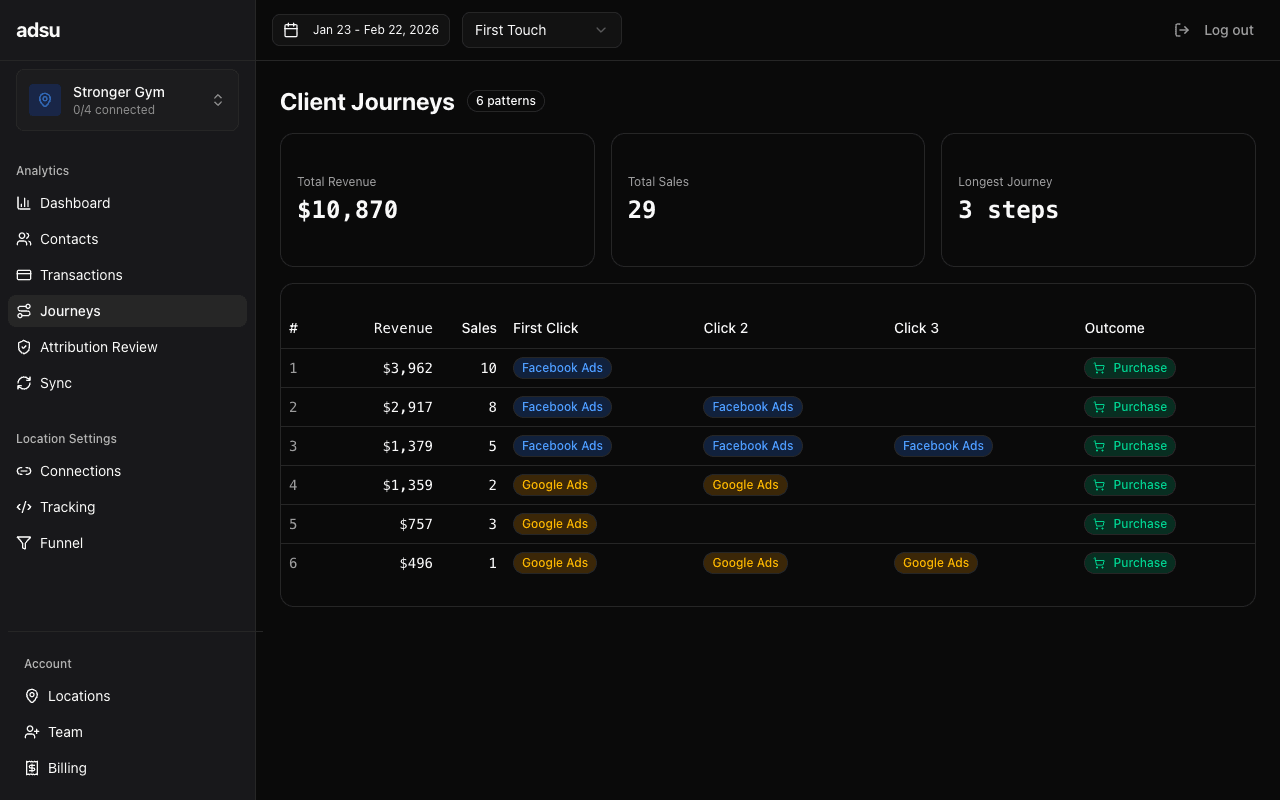
Click on any contact row to expand their full journey timeline. This visualization shows every recorded event in chronological order:
- Ad Clicks — When the contact clicked on one of your Meta or Google ads. Shows the campaign name, ad set, and specific ad creative.
- Page Views — Website visits captured by the Adsu tracking script. Shows the page URL and any UTM parameters associated with the visit.
- Form Submissions — When the contact submitted a form on your website (opt-in, contact form, scheduling request) or completed a Meta lead form.
- Stage Changes — Each time the contact advanced in your funnel. Shows the from-stage, to-stage, and the source of the change (webhook, auto_calendar, auto_payment, sync_catchup, etc.).
- Appointments — Calendar bookings from GoHighLevel, with the appointment date and time.
- Payments — Stripe charges and subscription events, showing the amount and transaction type.
Each event on the timeline is color-coded by type and timestamped. You can see the exact sequence of events that led from initial ad exposure to conversion, including the gaps between interactions. Long gaps between touchpoints often indicate where leads are stalling.
Multi-Touch Attribution Weights
When a contact has attributed revenue, the journey timeline also displays the attribution weight for each ad touchpoint based on your selected model. This lets you see precisely how credit is distributed across the path.
For example, a contact who clicked three different ads before converting would show different weight distributions depending on the model:
- Under First Touch, the first ad click shows 100% weight, and the other two show 0%.
- Under Last Touch, the final ad click before conversion shows 100%.
- Under Linear, each of the three clicks shows 33.3%.
- Under Time Decay, the most recent click shows the highest weight, with earlier clicks receiving progressively less.
These weights are the same ones used in the revenue calculations on the Campaigns and Transactions pages. Viewing them in the journey timeline gives you context for why a particular campaign receives the credit it does.
Speed-to-lead on journeys
For contacts in the "new" or "contacted" stage, the journey view includes a speed-to-lead indicator. This measures the time between the contact's most recent intent signal (their latest ad click, form submission, or inbound message) and the first manual outbound message from your staff in GoHighLevel. Studies consistently show that responding to leads within 5 minutes dramatically increases conversion rates.Common Journey Patterns
As you review journeys, you will start to notice patterns in how leads move through your funnel. Some common patterns for gym ad leads include:
- Single-touch conversion — The contact clicks one ad, fills out a lead form, books an appointment, and signs up. These are your fastest converters and typically come from high-intent campaigns.
- Multi-touch awareness to conversion — The contact sees a brand awareness ad, returns via a retargeting ad a few days later, fills out a form, and eventually converts. These journeys highlight the value of retargeting campaigns.
- Stalled journeys — The contact interacts with an ad and submits a form but never progresses past "new" or "contacted." These represent follow-up opportunities your team may be missing.
- Long-cycle journeys — The contact interacts with ads over several weeks before converting. These are common for high-ticket offers and demonstrate why attribution windows matter.
Filtering Journeys
The Journeys page supports several filters:
- Touchpoint count — Filter by minimum or maximum touchpoints to focus on single-touch or multi-touch journeys.
- Current stage — Show only journeys for contacts at a specific funnel stage.
- Date range — Controlled by the global date range selector. Shows contacts whose first touchpoint falls within the selected range.
Using Journeys for Optimization
The Journeys page is most valuable for understanding the qualitative story behind your numbers. Here are some ways to use it:
- Review the journeys of your highest-LTV members. What campaigns did they come through? How many touchpoints did they have? Use these patterns to inform your ad strategy.
- Look at stalled journeys (contacts stuck in early stages) to identify where your funnel is leaking. If many leads stall after the first touchpoint, your landing page or lead magnet may need improvement.
- Compare journey durations between campaigns. If one campaign produces leads that convert in 3 days while another takes 3 weeks, the faster campaign may be attracting more qualified prospects.
- Check speed-to-lead for recent leads. If your team is consistently slow to respond, that is a process issue worth addressing regardless of which campaigns are running.